Published
Define the transmitter requirement
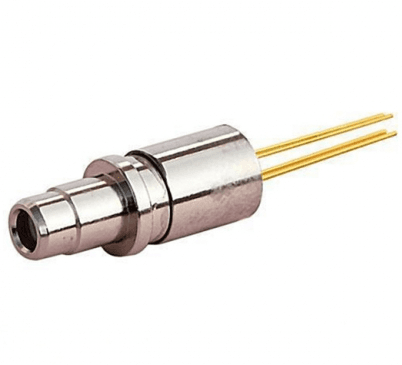
A TOSA is a transmitter optical subassembly. Its function is to produce the optical signal for transmission. Start selection with the transmitter requirements, then check the electrical and mechanical interfaces.
Write a short requirement sheet before making a shortlist. Include the application, required data rate, wavelength range and optical-output limits. State the conditions under which each limit must apply. Separate fixed design requirements from preferences that the supplier may propose changing.
Use the TOSA family page to find product pages for review. Treat the page title as a navigation label. Make the selection from the applicable specification, drawing and confirmed configuration.
Browse the TOSA product family
Record the fields that determine the shortlist
Give every required limit a unit and a test condition. Record the required laser type only if the design requires one. If it is open, ask the supplier to identify the type in the proposed configuration.
TOSA selection worksheet
Use these fields to record your design requirements. They are questions for selection, not a list of available configurations.
Selection field: Application; What to record: Transmitter role, protocol and required data rate; What to check: The offered configuration is checked for the application.
Selection field: Wavelength; What to record: Required range and temperature condition; What to check: Min., Typ. and Max. stay with the test condition.
Selection field: Optical output; What to record: Required lower and upper limits; What to check: The correct configuration and test condition are identified.
Selection field: Laser and isolator; What to record: Required type and isolation requirement, if any; What to check: The offer states which configuration is included.
Selection field: Electrical interface; What to record: Drive, monitor interface and pin assignment; What to check: The specification and circuit requirements agree.
Selection field: Mechanical interface; What to record: Package envelope, connector, polish and mounting; What to check: The applicable drawing is reviewed.
Selection field: Environment; What to record: Temperature range and measurement point; What to check: Functional conditions are kept separate from stress ratings.
Selection field: Purchase record; What to record: Quantity, target date and required documents; What to check: The actual offer confirms availability and terms.
Use the same worksheet for every candidate. Do not compare a limit measured under one condition with a value measured under another without recording the difference. Keep an unresolved field open instead of choosing the most convenient value from a title, feature list or different part.
Keep each parameter beside its condition
The linked DTNT transmitter page includes a center-wavelength row and separate threshold-current rows for different temperature conditions. The excerpt below retains the original column order and wording. It demonstrates how to read the table; it does not confirm an orderable variant.
Transmitter Electro-Optical Characteristics (TC=25°C, CW)
Selected rows from the linked product page. The source column labels, symbols, units, blank cells and row conditions are retained. Read the full product table before approving a part.
Item: Threshold Current; Symbol: ITH; Test Condition: TC=25℃; Min.: ---; Typ.: --; Max.: 15; Unit: mA
Item: Threshold Current; Symbol: ITH; Test Condition: TC= -40~+85℃,; Min.: ---; Typ.: --; Max.: 40; Unit: mA
Item: Center Wavelength; Symbol: λC; Test Condition: CW, TC=-40~85℃,TX;1310nm; Min.: 1290; Typ.: 1310; Max.: 1330; Unit: nm
Read the complete source table
Read the center-wavelength row across the Min., Typ. and Max. columns. Read each threshold-current row with its own Test Condition cell. Keep any row-specific condition with that row when you prepare the comparison.
For optical output, return to the full product table. Identify the row that applies to the required configuration and operating condition. Ask for clarification when a row does not identify the offered configuration. Do not turn a distance label into a system-level reach guarantee.
Keep the absolute-maximum section separate from the functional characteristics. Stress ratings alone do not establish that the part meets its functional limits under those conditions.
Open the transmitter characteristics table
Confirm the offered optical configuration
List the wavelength range, required data rate and optical-output range in the enquiry. If an isolator is required, state that requirement and ask which configuration includes it. Ask for the optical limits that apply to that configuration.
- Which laser type is included in the proposed part?
- Which wavelength and output limits apply at the required temperature?
- Which test conditions support the stated data rate?
- Is the required optical interface included in the offered configuration?
- Which specification and drawing revisions identify that configuration?
Keep the answers as a single configuration record. Avoid combining the output of one option with the mechanical details of another. If the supplier proposes an alternative, review the changed fields before accepting it.
Review the drawing and electrical interface
Check the package envelope, mounting arrangement, optical interface and pin assignment against the design. Give the supplier the required connector and polish. Ask for the drawing that belongs to the offered part, including its revision.
The linked LC TOSA product page includes an outline drawing. Use the drawing as a review entry point and confirm its applicability to the offered configuration. Do not infer an electrical pin assignment from the product name.
Open the LC TOSA page and outline drawing
Record the required electrical drive conditions, monitor interface and thermal conditions in the selection sheet. Ask for any missing pin-level information before designing the connection or ordering evaluation parts.
- Check the drawing revision and the quoted part reference together.
- Confirm the pin assignment and any case connection.
- Check the optical interface orientation and available mounting space.
- Ask for handling and assembly instructions that apply to the part.
- Identify any required conformity document by name and revision.
Prepare the TOSA enquiry
Use the template below to make the requirements clear. Replace the bracketed text with your design data. Keep availability, quantity and delivery questions separate from the technical acceptance requirements.
- Application: [transmitter role, protocol and required data rate].
- Candidate: [product URL or supplier part reference].
- Optical requirements: [wavelength range, output limits and test conditions].
- Configuration: [required laser type, isolator requirement or questions to resolve].
- Electrical requirements: [drive conditions, monitor interface and pin assignment].
- Mechanical requirements: [package envelope, connector, polish and mounting constraints].
- Environment: [temperature range, measurement point and other required conditions].
- Evaluation: [sample quantity, acceptance checks and required documents].
- Commercial request: [forecast quantity, target date and questions on availability, minimum order quantity and lead time].
Ask the response to identify the offered configuration, its document revisions and every exception to the requirement sheet. An answer that only repeats the family name leaves the configuration open.
Approve the configuration and evaluation record
Before placing an order, compare the offer against the worksheet. Keep the part reference, specification revision and drawing revision together. Record who accepts each exception and which questions still need an answer.
- Agree on the test conditions for each required optical limit.
- Confirm the electrical and mechanical interfaces.
- Record the evaluation result against the agreed acceptance criteria.
- Obtain the documents required by the project.
- Confirm order quantity, delivery terms and any configuration restrictions.
Keep the accepted record for repeat orders. Review the affected fields if the application, operating conditions, drawing or offered configuration changes. This keeps the purchasing decision tied to the design requirement.
Common selection questions
Does the title identify every selectable option? Use it to find the page. Ask for the exact offered configuration and its supporting documents.
Can I assume that a listed isolator value applies to every option? Ask which configuration and test condition the value belongs to before using it in the design.
Is a maximum current in a stress-rating table the intended drive setting? Keep stress ratings separate from operating and test conditions. Ask for the applicable drive requirements.
What is the next step when a connector or pin detail is missing? Request the applicable drawing and pin assignment. Keep the part on the shortlist until the missing detail is resolved.
Browse the TOSA product family