Published
Start with the link requirements
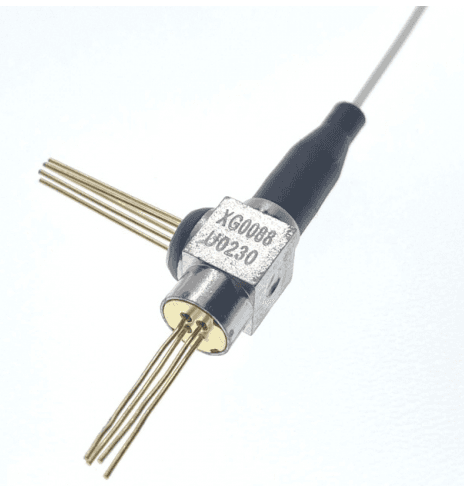
A BOSA is a bidirectional optical subassembly. It combines optical transmit and receive functions. This guide helps you turn a link requirement into a product shortlist and a request for quotation (RFQ).
Write down the equipment role, protocol and required data rate before comparing products. For a PON design, state whether the assembly is for the ONU or OLT. Name the exact PON mode. Do not use a product family name as the complete specification.
Keep the transmit path and receive path in separate rows of your selection sheet. Mark each requirement as mandatory, preferred or still open. This gives the supplier a clear basis for checking a candidate instead of guessing which field matters most.
Browse the BOSA product family
Build a channel-by-channel selection sheet
Use Tx for the transmitter and Rx for the receiver. Record the wavelength and data rate for each path. Add the required optical power limits for Tx and the required sensitivity and overload conditions for Rx. A useful comparison keeps each value beside its test condition.
BOSA selection worksheet
Use these fields to record your design requirements. They are questions for selection, not a list of available configurations.
Selection field: Application; What to record: Equipment role, protocol and operating mode; What to check: The candidate is assessed for the required role.
Selection field: Transmit path; What to record: Wavelength range, data rate and output requirement; What to check: Limits, units and test conditions remain together.
Selection field: Receive path; What to record: Wavelength range, data rate, sensitivity and overload; What to check: Receiver conditions match the design requirement.
Selection field: Electrical interface; What to record: Supply, pin assignment and circuit constraints; What to check: The quoted interface matches the circuit.
Selection field: Mechanical interface; What to record: Pigtail or receptacle, connector, polish and envelope; What to check: The applicable drawing matches the installation.
Selection field: Temperature; What to record: Required range and measurement point; What to check: Storage limits are kept separate from operating conditions.
Selection field: Purchase record; What to record: Quantity, target date and required documents; What to check: Availability and terms are confirmed in the offer.
For an assembly with several channels, repeat the channel fields. Ask which table applies to each channel and which functions belong to the same orderable configuration. Leave a field open when the product page does not answer it. Do not combine rows from different configurations to create a new specification.
Read the transmitter and receiver tables separately
The linked DTNT ONU BOSA page has separate transmitter and receiver tables. The following excerpts show how to keep the path, range and test conditions together. They are a table-reading example; they do not select a part for your design.
Transmitter Optical And Electrical Characteristics (Unless specified else,the specifications below are defined at TC=0-85℃ )
Selected rows from the linked product page. The source column labels, symbols, units, blank cells and row conditions are retained. Read the full product table before approving a part.
Parameter / Symbol: Output Optical Power; Symbol: Pf; Min.: 2.8; Typ.: [blank in source]; Max.: 5.0; Unit: mW; Note: CW, Iop= Ith+20mA
Parameter / Symbol: Center Wavelength; Symbol: λc; Min.: 1260; Typ.: 1270; Max.: 1280; Unit: nm; Note: CW, Iop=Ith+20mA Tc=0~85℃
Read the complete source table
For the transmitter, read the center-wavelength row across its Min., Typ. and Max. columns. Keep the optical-output row with its stated current condition. Ask for the limits at your required conditions when they differ from the table.
Receiver Optical and Electrical Characteristics(Unless specified else,the specifications below are defined at TC=0-85℃ )
Selected rows from the linked product page. The source column labels, symbols, units, blank cells and row conditions are retained. Read the full product table before approving a part.
Parameter: Operating Wavelength; Symbol: λ; Min.: 1575; Typ.: 1577; Max.: 1580; Unit: nm; Condition: [blank in source]
Parameter: Supply Voltage; Symbol: Vcc; Min.: 3.0; Typ.: 3.3; Max.: 3.6; Unit: V; Condition: [blank in source]
Read the complete source table
For the receiver, keep the wavelength and supply-voltage rows separate. Review the complete sensitivity row on the product page, including its data rate and test conditions. Do not shorten a sensitivity requirement to a power value alone.
Open the ONU BOSA technical tables
Separate operating temperature from storage temperature
The same page lists storage temperature and operating case temperature as separate rows. Copy the row label with the value so that the required operating range is clear.
ABSOLUTE MAXIMUM RATINGS(Tc=0-85°C unless otherwise noted)
Selected rows from the linked product page. The source column labels, symbols, units, blank cells and row conditions are retained. Read the full product table before approving a part.
Parameter: Storage Temperature; Symbol: Tstg; Min.: -40; Max.: 85; Unit: ℃
Parameter: Operating Case Temperature; Symbol: Top; Min.: 0; Max.: 85; Unit: ℃
Read the complete source table
Use the characteristics tables to check performance conditions. Absolute maximum ratings describe stress limits and do not, by themselves, establish functional performance across that range.
State where your temperature requirement is measured: at the case or in the surrounding air. Ask for confirmation at the required limits. Do not treat a storage limit or a broad temperature label as the operating specification.
Check the optical interface and the drawing
Select a candidate by its full interface requirement. Record whether the design needs a pigtail or a receptacle, the connector and polish, and any fiber routing constraint. Use the mechanical drawing to check the mounting space and connection orientation.
- Request the drawing revision that applies to the quoted configuration.
- Match the pin assignment to the electrical interface in your design.
- State any required pigtail length and connector orientation.
- Ask which optical and electrical interfaces are included in the quoted part.
- Record any required evidence of conformity by its exact document name.
Keep the product URL and the drawing revision in the selection record. A package name alone is not enough to approve the mechanical fit. If a critical detail is missing, ask for that detail before ordering evaluation parts.
Send a technical enquiry that can be checked
Copy the template below into your enquiry. Replace each bracket with your own requirement. Keep unknown items marked as questions. Include the required quantity and target schedule as your request, and ask the supplier to confirm them.
- Project and equipment role: [application, protocol, ONU/OLT or other role].
- Candidate reference: [product URL and drawing revision, if available].
- Transmit path: [wavelength range, data rate, optical output and test conditions].
- Receive path: [wavelength range, data rate, sensitivity, overload and test conditions].
- Electrical interface: [supply, pin assignment and circuit constraints].
- Mechanical interface: [pigtail/receptacle, connector, polish, routing and mounting limits].
- Environment: [operating temperature, measurement point and other required conditions].
- Evaluation: [sample quantity, acceptance checks and required documents].
- Commercial request: [forecast quantity, target date and questions on availability, minimum order quantity and lead time].
Ask the reply to identify the offered configuration and any exceptions to your requirements. Keep technical exceptions separate from price and delivery terms. This makes the next review easier to approve.
Close the selection record before ordering
Review the reply against the same selection sheet. Record the proposed part reference, drawing revision and specification revision. For each open field, keep the supplier response and the person responsible for accepting it.
- Confirm which Tx and Rx limits apply to the same configuration.
- Agree on the evaluation conditions and acceptance criteria.
- Check the drawing and electrical interface against the design.
- Keep any requested conformity documents with the selected part record.
- Confirm the commercial terms for the actual order.
After evaluation, save the accepted configuration and document revisions with the purchase record. If the design requirement changes, review the affected fields again.
Common selection questions
Can I select a BOSA from its family name alone? Use the family page to find candidates. Use the product tables, drawing and supplier response to select the configuration.
Should the Tx and Rx data rates be assumed equal? Record them separately. Ask for confirmation of each path for the required operating mode.
Can a storage-temperature row establish an operating requirement? Keep storage and operating requirements separate. Check the functional conditions in the characteristics tables and ask about any missing condition.
What if the page does not state the order quantity or delivery date? Include your required quantity and target date in the enquiry. Request a confirmed offer for the selected configuration.
Browse the BOSA product family